Cash, Loan or Trade: Paying for Your First Boat Without Sinking
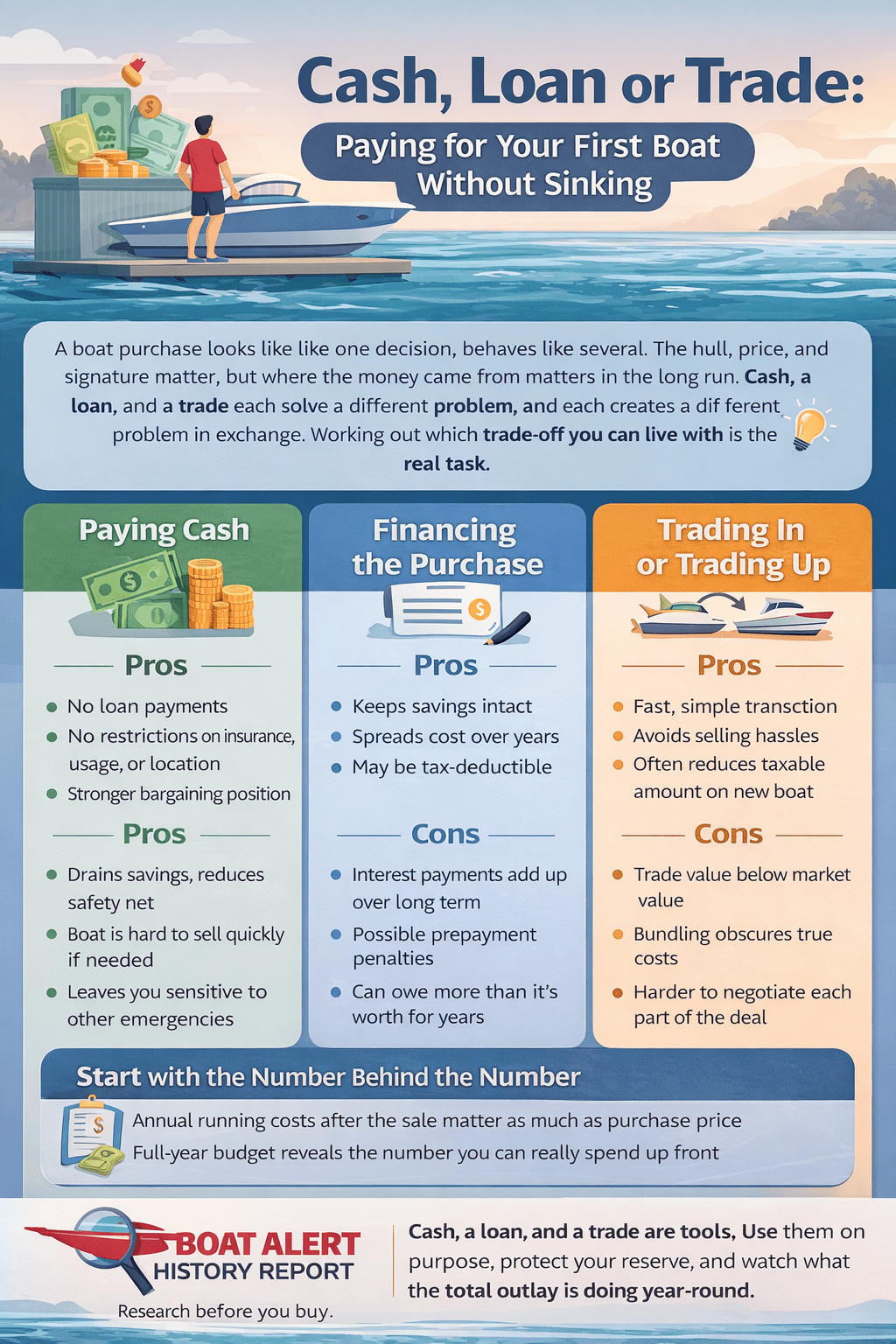
A boat purchase looks like one decision and behaves like several. You pick a hull, agree on a price, sign a few pages, and the thing is yours. What decides whether the purchase still feels good three summers later is quieter than any of that: where the money came from, and what it cost you to move it there.
Buyers will spend months comparing engine hours and beam widths. The payment method often gets ten minutes at a desk with a salesperson waiting. That imbalance explains a lot of unhappy owners who genuinely like their boats. Cash, a loan, and a trade each solve a different problem, and each one creates a new problem in exchange. Working out which trade-off you can live with is the real task, and it happens well before anyone backs a trailer down a ramp.
Start With the Number Behind the Number
The price on the listing covers the boat. It does not cover the season.
What lands on you after the sale
Sales tax and registration arrive first, usually within weeks. Insurance follows, then storage, whether that means a slip, a dry stack, a mooring, or a patch of your own driveway. After that comes the slow drip: fuel, oil changes, impellers, bottom paint, batteries, canvas that fades faster than you expect. Boats also sit still for months in most of the country, and sitting still is not free. Winterizing and spring commissioning are real line items. A useful habit is to build a full-year budget before shopping, and detailed ownership cost breakdowns make that easier than guessing. The exact figures vary wildly by size and region. The pattern does not.
Why this shapes the payment question
Once you know your yearly running cost, the payment question changes shape. You are no longer asking what you can afford to buy. You are asking how much monthly room you can leave open for everything the boat will ask for after you own it. A method that saves you money up front but eats that room is a bad deal dressed up as a good one. Keep that room in mind through everything that follows.
Paying Cash
Cash is the simplest path and the one people romanticize most.
What owning outright gets you
No payment. No lender telling you which insurance policy qualifies, no minimum coverage floor, no restrictions on where the boat lives or how far you take it. Selling later is easy because nobody else has a claim on the title. Negotiating tends to go better too, since a seller weighing two offers usually prefers the one with no financing contingency attached. Cash also removes the temptation to stretch. You can only buy what you actually have.
What it quietly takes
Draining an account to buy a boat leaves you owning an asset that is hard to convert back into money quickly. Boats sell slowly. They sell especially slowly in October. If a roof or a transmission fails the same year you buy, you may find yourself borrowing at worse terms than a boat loan would have carried, or selling the boat under pressure. Paying cash and keeping nothing in reserve is not the conservative choice people assume it is. It just moves the risk somewhere less visible.
Financing the Purchase
Borrowing keeps your savings intact and spreads the cost across the years you actually use the boat. That flexibility comes with a price tag you need to read carefully.
How boat loans differ from car loans
Terms run long, often ten to twenty years on larger purchases, which makes the monthly figure look friendly. Stretching the term also means paying interest for a long stretch while the boat loses value, so it is possible to owe more than the hull is worth for years. Lenders usually want a down payment, proof of insurance, and sometimes a survey on older boats. Larger vessels may need federal documentation before a lender will release funds.
Consider trading in your old vessel to save on boat taxes.
Reading an offer properly
Compare the annual percentage rate rather than the monthly payment, since the APR folds in fees the headline rate leaves out. The difference between a loan’s interest rate and its APR is where a lot of money hides. Get at least two offers, ideally one from a bank or credit union you already use and one from the dealer. Ask directly about prepayment penalties, origination fees, and whether the rate is fixed. Dealer financing is convenient and sometimes competitive, but convenience is not evidence of a good rate.
Trading In or Trading Up
Trades enter the picture when you already own something on the water, or when a dealer will take a trailer, a personal watercraft, or an older hull against the new purchase.
Where a trade earns its keep
Speed is the main benefit. A private sale means photographs, listings, tire kickers, and strangers at your house on a Saturday. A trade removes all of that in an afternoon. In many states, a trade also reduces the taxable amount of the new purchase, which can be worth real money depending on where you live. For an older boat with cosmetic issues, the gap between trade value and private sale value is often smaller than people expect.
Where it costs you
Dealers price trades to resell them at a profit, so the offer will sit below market. The bigger risk is bundling. When the trade value, the purchase price, and the loan terms all get negotiated as one blur, it becomes very hard to see which piece moved. Settle each number on its own. Look up what your current boat is realistically worth using a reference like J.D. Power’s marine values before the conversation starts, and treat any figure below that as something to discuss rather than accept.
The Account Sitting Underneath All of This
Every method above runs through a bank account, which is why the account itself deserves more attention than it usually gets.
Separating boat money from everything else
A dedicated account for the boat does something a spreadsheet cannot. It makes the true cost visible. Move a set amount every month, pay the slip fee, the insurance, and the fuel out of it, and by autumn you know exactly what the season cost without reconstructing anything. Buyers who have never set up a second account often ask the same question: How do I get a bank account for a purpose like this? The answer is usually a short online application rather than an afternoon in a branch. Look for no monthly fee, interest on the balance while the money waits, and fast transfers, since down payments and deposits tend to be time-sensitive.
Three changes: the embedded question now has a colon and a question mark so it reads as a quoted question instead of running into the rest of the sentence; the stray space inside the link brackets is gone (it was pushing a space into the anchor text); and “time sensitive” is hyphenated.
Records, proof, and leverage
Lenders want to see steady deposits and a healthy balance history. Sellers want to know your funds are real. An account with clean records covers both. It also gives you documentation at tax time and a clear trail if a deal falls apart and a deposit needs to come back.
Choosing Without Regret
There is no universally correct answer here, only a fit between your finances and your tolerance for risk. Cash buys freedom and costs liquidity. A loan preserves cash and costs interest. A trade buys time and costs some value. Each becomes the wrong choice when it is picked for convenience instead of on purpose. Decide what your season truly costs, protect enough reserve to absorb a surprise, price every element separately, and keep the money organized somewhere you can see it. Do that, and the payment method stops being the part of ownership you think about. Which is exactly where it belongs.
Categories: To learn more about Boat-Alert.com History Reports for used boats and check a boats title problems online visit: www.Boat-Alert.com